
Prepare your big moments.
Give every scene in your campaign its own music, artwork and ambience.
THE IMMERSIVE CONTROL ROOM FOR YOUR TTRPG SESSIONS
You tell the story.
Taverne gives it light, sound and a world.
Choose the next chapter.
Even better with sound.
The same magic. At your real table.
About early accessGive every scene in your campaign its own music, artwork and ambience.
Start the scene at just the right moment. Your screen, sound and compatible lights come alive.
A sudden sound, a change of mood: stay in control while telling your story.
This room is virtual. At home, Taverne controls your music, player screen and, if you have them, your Philips Hue lights.Explore the features
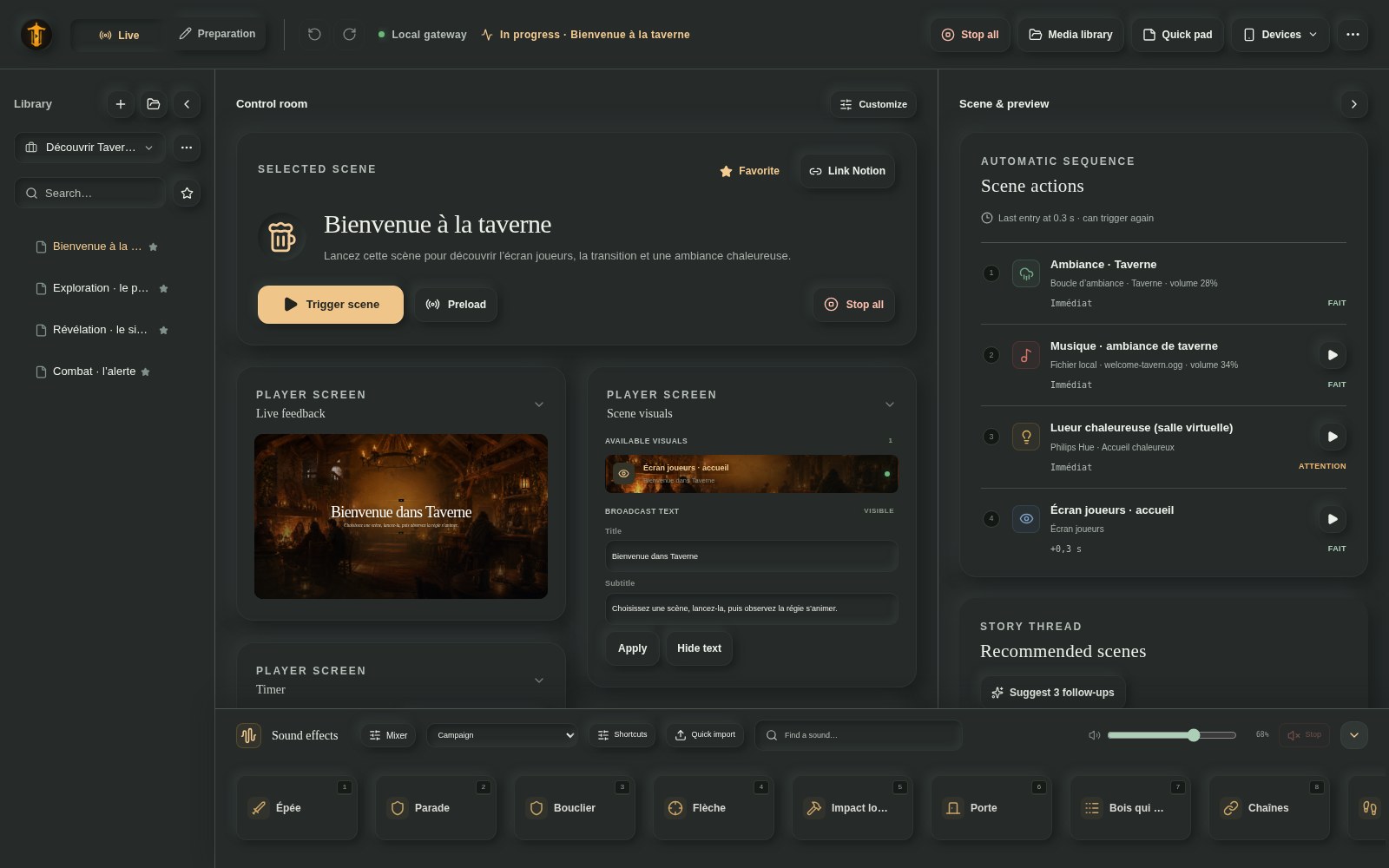
Your scenes on the left. The next cue in the centre. Sound effects and the player screen within reach. This is the application as it stands today.
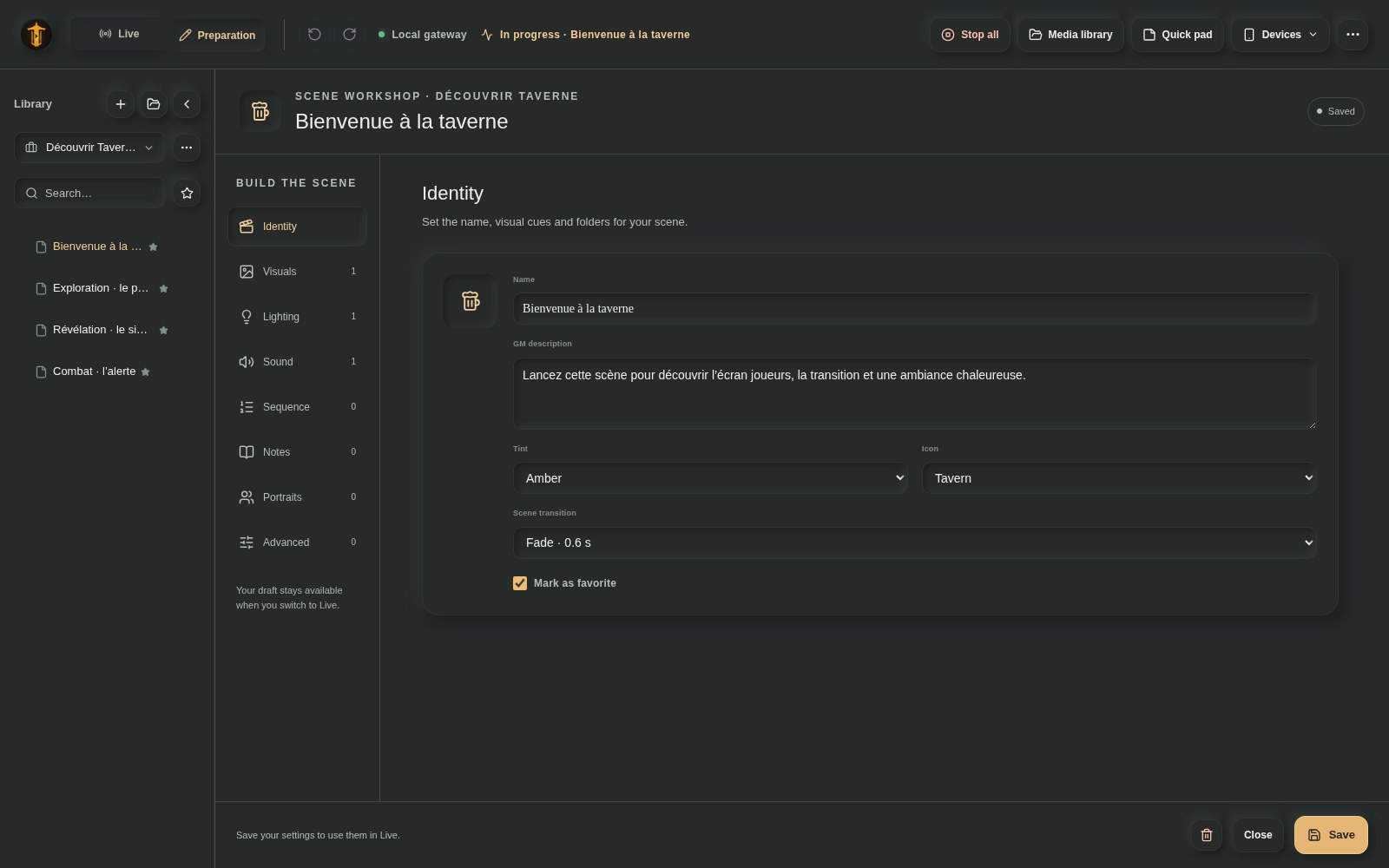
Organise scenes by campaign, choose an image, add music and prepare actions. Scene templates and undo/redo help you get the details right.
Trigger a scene, step through a GO/WAIT sequence or play a sound effect on the fly. The player screen follows along; your notes stay on your side.
The video demonstration is in preparation. For now, explore screenshots of the application.
Scenes, music and sound effects. Enough to give your next session a different feel.
Images, videos, portraits and a timer on a TV or a second screen.
A compatible Philips Hue bridge and lights to accompany key moments. Hardware is optional.
Local scenes and media work offline. Downloads, online media and managed services need an Internet connection. AI is optional: you can prepare everything by hand.
Taverne handles the atmosphere around your physical table. No battlemaps, dice, character sheets, rules engine or video calls. Keep your books, your habits and your way of playing.
Plans may change. No release schedule is guaranteed.
Live and Preparation modes; GO/WAIT Cue Stack; templates; undo/redo; manual actions; audio routing and mute; campaign and scene sound effects bars; audio and video on the player screen; portraits, Turn Order and appearances with GIF/video; Hue Entertainment effects; .taverne packages.
Stabilisation, qualification and English interface. A FR/EN showcase campaign is in preparation. Next: translated logs and errors, out-of-sequence events and, priorities permitting, mixed playlists. Managed AI and media services are already available to authorised testers.
Signed macOS and Windows installers, with signed automatic updates.
Native Home Assistant, WLED, OBS and Stream Deck integrations; Govee/Nanoleaf feasibility and an integration API; procedural soundscapes; pack installation; optional Taverne Connect; an expanded managed AI offering; a community library, marketplace and Venue licence.
EARLY ACCESS
Taverne is shaped by feedback from its first tables. Access is opening gradually, by invitation.
Yes, with an invitation. Invited testers can sign in to download their version. Early access is gradually welcoming new tables; check the early access page for the waitlist status.
Windows and macOS. No Linux installer is offered for early access.
The website is available in French and English. English interface — some logs and error messages are still in French. Translation of the application is ongoing.
The app is free during early access. Testers keep a personal discount at launch. The final price and discount amount will be announced later.
No. Taverne is an atmosphere control room for in-person tabletop sessions. It does not replace your rules, character sheets or a VTT.
No. A computer and speakers are enough. A player screen and Philips Hue lights are optional additions.
Yes, with your local scenes and media, for up to 30 days after online licence verification. Initial activation and renewal require Internet access, as do online media and managed services.
No. You can create and edit every scene by hand. Managed AI and media services are available to authorised testers; you can also use your own keys.